Thank you
Switch Pro on in under a minute
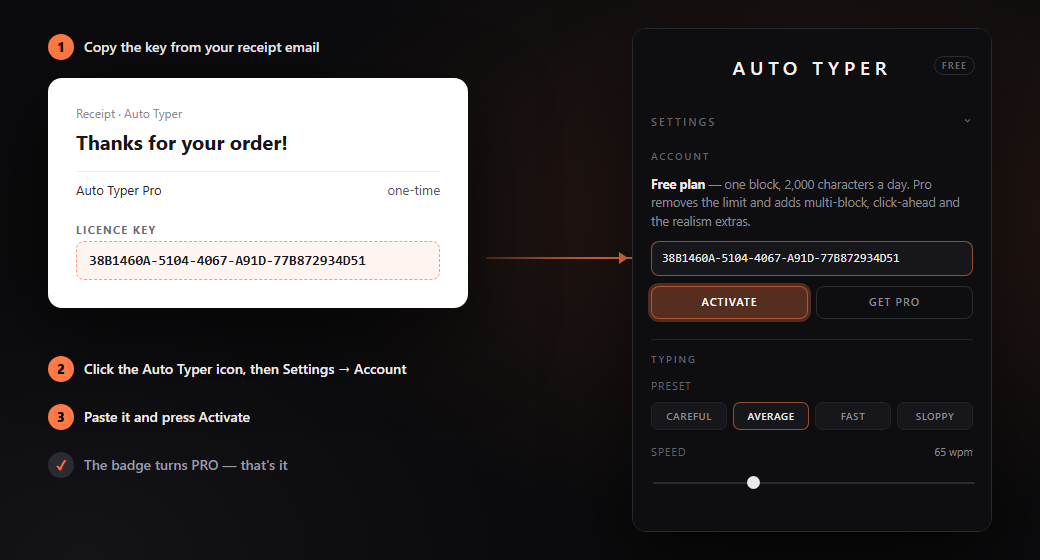
- Copy the licence key from the receipt email — the whole thing, it looks like
38B1460A-5104-… - Open Auto Typer: click its icon in Chrome's toolbar (if it isn't pinned, it's under the puzzle-piece icon), then open Settings → Account.
- Paste the key and press Activate. The badge at the top of the panel turns PRO, and multi-block and the other Pro settings unlock.
Can't find the key?
Search your inbox — and spam — for the receipt. Or open My Orders on Lemon Squeezy and enter the email address you bought with: they send you a sign-in link, and the key is in the order. Still stuck? Email autotyper.help@gmail.com.
Using it on another computer
One key works on up to 3 of your own computers at a time. To move it, open Settings → Account on the old one and choose Deactivate on this device, then activate on the new one. If the old computer is gone, email us and we'll free the slot.
If activation says…
| Message | What to do |
|---|---|
| That licence key does not exist | Copy it again from the receipt. A missing character at either end is the usual cause. |
| …already active on its maximum number of devices | Deactivate it on a computer you no longer use (see above), or email us. |
| That key is for a different product | It's a key from another purchase. Use the one from your Auto Typer Pro receipt. |
| Could not reach the licence server | Check your internet connection and try again. Once activated, Pro keeps working offline for up to 14 days at a time. |
| This licence has been disabled | This happens after a refund. If you didn't ask for one, email us. |
Not what you wanted?
Email autotyper.help@gmail.com within 14 days of buying and you'll get a full refund.